
Discover & Explore Resources
Never use campus passwords to sign up for 3rd-party tools and always read the terms of use. Read more.
Apply Filters
-

ShowMe
ShowMe can be used to create beautiful tutorials with the top of your finger. With the ShowMe app, educators can use the iPad as an interactive whiteboard and record voice-over lessons. If desired, these can then be shared with the public. The best of the lessons are available online on the ShowMe.com Web site. …
-

Pocket
Pocket was developed to help people save interesting articles, videos and more from the web for later enjoyment. Once saved to Pocket, the list of content is visible on any device — phone, tablet or computer. It is free and available for major devices and platforms including iPad, iPhone, Android, Mac, Kindle Fire, Kobo, Google…
-

ALA Framework for Information Literacy for Higher Education
The Framework for Information Literacy for Higher Education which has been published by the Association of College and Research Libraries (ACRL). The Framework is organized into six frames, each consisting of a concept central to information literacy, a set of knowledge practices, and a set of dispositions. The six concepts that anchor the frames are presented alphabetically: Authority…
-

The 10 Best Fact Checking Sites
This list of the top 10 sites helps students, or anyone, determine the bias and accuracy of information, which is published by International Society for Technology in Education (ISTE). This site introduces you to 10 fact-checking sites. Top 10 sites to help students check their facts Keywords: Digital Literacy, Lifelong Learning
-
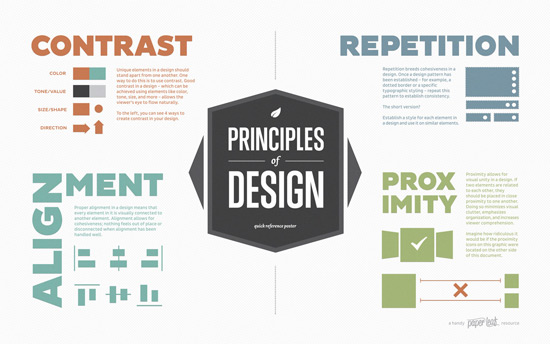
Elements of Design Quick Reference Poster
This poster, created by Paperleaf, is a handy reference that provides a quick overview of the C.R.A.P. principles of design; a refresher for those in the know, and a starting point for design newbies. C.R.A.P stands for Contrast, Repetition, Alignment, and Proximity. Keep these concepts in mind to remind yourself of prominent design principles. Principles of…
-
Web2Access (Disabilities and Tests)
Web2Access is a resource that aims to help those making decisions about their use of freely available ‘Web 2.0’ interactive and collaborate e-learning tools. The website provides rankings based on its accessibility. Web2Access Web2Access (Disabilities and Tests) – tests the accessibility of Web 2.0 tools based on different disabilities. Using the results, they then rank…
-

7 Things You Should Know About Open Education – EDUCAUSE Learning Initiative (ELI)
Open educational resources (OER) are teaching, learning, and research materials in any medium that reside in the public domain or that have been released under an open license that permits no-cost access, use, adaptation, and redistribution by others. The 7 Things You Should Know About… series from the EDUCAUSE Learning Initiative (ELI) provides concise information on emerging learning technologies. Each brief focuses on…
-
Libby, by OverDrive – an app for library ebooks and audiobooks
Download thousands of ebooks and audiobooks from your local library. You can borrow items, instantly, for free, using a mobile device. The app works together with Overdrive. Since a Library card is needed to check out items, the use of this app may be slightly limited. Libby Keywords: Lifelong Learning
-

Animoto
Animoto is a cloud-based video creation service that produces video from photos, video clips, and music into video slideshows. Animoto Keywords: Audio, Media, Photos & Images, Presentations, Video
-
How to Improve Audio Quality with Audacity
This blog post from LearnUpon has a few practical tips on how to improve sound quality in audio recordings. The tips are targeted to using Audacity and they are also applicable to the use of other audio authoring tools. Poor audio quality is one of the most frustrating things you can subject your learners to. Not…
EmTechWIKI only improves with your help.
Rate resources by clicking the up or down arrows when viewing an item’s page, no login needed.
Create an account and log in to contribute new resources to the WIKI. Learn more.