
Discover & Explore Resources
Never use campus passwords to sign up for 3rd-party tools and always read the terms of use. Read more.
Apply Filters
-

iNaturalist
The iNaturalist app helps you upload citizen science observations of plants and animals to the iNaturalist.org online community for naturalists as well as other members of the iNaturalist network such as NaturaLista.mx in Mexico. You can: record observations with photos and GPS locations; explore observations from around the world; keep track of updates from people you…
-

Explain Everything
Explain Everything is a cloud collaboration platform built on the learning technology of tomorrow. Whether you’re sending just-in-time messages to colleagues or recording lessons for students, Explain Everything is the imagination space that helps you tell your unique story. It works like an interactive whiteboard, allowing for quick communication with students, colleagues, and customers. Write,…
-

ShowMe
ShowMe can be used to create beautiful tutorials with the top of your finger. With the ShowMe app, educators can use the iPad as an interactive whiteboard and record voice-over lessons. If desired, these can then be shared with the public. The best of the lessons are available online on the ShowMe.com Web site. …
-

Pocket
Pocket was developed to help people save interesting articles, videos and more from the web for later enjoyment. Once saved to Pocket, the list of content is visible on any device — phone, tablet or computer. It is free and available for major devices and platforms including iPad, iPhone, Android, Mac, Kindle Fire, Kobo, Google…
-
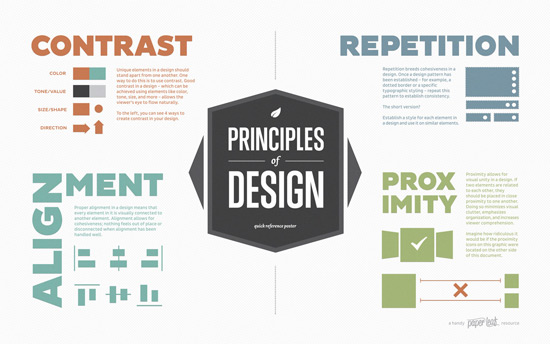
Elements of Design Quick Reference Poster
This poster, created by Paperleaf, is a handy reference that provides a quick overview of the C.R.A.P. principles of design; a refresher for those in the know, and a starting point for design newbies. C.R.A.P stands for Contrast, Repetition, Alignment, and Proximity. Keep these concepts in mind to remind yourself of prominent design principles. Principles of…
-

Google Forms
Google Forms lets you easily collect online survey responses. It’s completely free and has no restrictions on the number of surveys you can create the number of questions in each survey or the number of responses you can collect. You can also automatically export your results to Google Sheets for online access and sharing. …
-

How to Improve Audio Quality with Audacity
This blog post from LearnUpon has a few practical tips on how to improve sound quality in audio recordings. The tips are targeted to using Audacity and they are also applicable to the use of other audio authoring tools. Poor audio quality is one of the most frustrating things you can subject your learners to. Not…
-

RealtimeBoard
The Ultimate Guide to Effective Remote Collaboration
-

9 Ways to Be a Good Digital Citizen – using technology appropriately
This webpage from Digital Citizenship, developed by Mike Ribble, shares Nine Elements of Digital Citizenship. They fall into three categories, which are listed below. Respect Your Self / Respect Others Etiquette Access Law Educate Your Self / Connect with Others Communicate Literacy Commerce Protect Your Self / Protect Others Rights & Responsibilities Safety (Security) Health…
-

Adobe Education Exchange
Adobe Education Exchange is a free learning platform and community, designed by educators for educators. It’s a great place to find materials to help you and your students learn about working with images, video, and audio media. Adobe Education Exchange After you’ve logged into “EdEx” you’ll find: Lesson plans and other learning materials…
EmTechWIKI only improves with your help.
Rate resources by clicking the up or down arrows when viewing an item’s page, no login needed.
Create an account and log in to contribute new resources to the WIKI. Learn more.